By the end of this guide, you’ll have:
  • ✅ Created a webhook endpoint in your application
  • ✅ Registered it with Magic Hour
  • ✅ Tested it with a real API call
  • ✅ Verified webhook delivery works

What Are Webhooks?

Webhooks let you receive real-time notifications when your API requests complete, eliminating the need for polling. Instead of repeatedly checking job status, Magic Hour automatically notifies your application when jobs finish. Benefits:
  • ✅ Real-time notifications (no polling delays)
  • ✅ Efficient resource usage (no constant polling)
  • ✅ Better user experience (instant updates)
  • ✅ Scalable for high-volume operations

Step 1: Create Your Webhook Endpoint

First, create a simple webhook handler that can receive and process events.
Using Jupyter/Colab? See the “Colab/Jupyter” tab below for notebook-compatible code, or use webhook.site for instant testing without any code.
from fastapi import FastAPI, Request
import json

app = FastAPI()

@app.post("/webhook")
async def webhook_handler(request: Request):
    # Get the event data
    event = await request.json()

    # Log the event for testing
    print(f"Received event: {event['type']}")
    print(f"Payload: {json.dumps(event['payload'], indent=2)}")

    # Handle different event types
    match event['type']:
        case 'video.started':
            print('🎬 Video processing started')
        case 'video.completed':
            print('✅ Video processing completed')
            # Download URL available in event['payload']['downloads']
        case 'video.errored':
            print('❌ Video processing failed')
        case 'image.completed':
            print('🖼️ Image processing completed')
        case 'image.errored':
            print('❌ Image processing failed')

    # Always return success
    return {"success": True}

if __name__ == "__main__":
    import uvicorn
    uvicorn.run(app, host="0.0.0.0", port=8000)

Step 2: Make Your Endpoint Publicly Accessible

Your webhook endpoint needs to be accessible from the internet. Choose one of these options:

Step 3: Register Your Webhook with Magic Hour

1

Visit Developer Hub

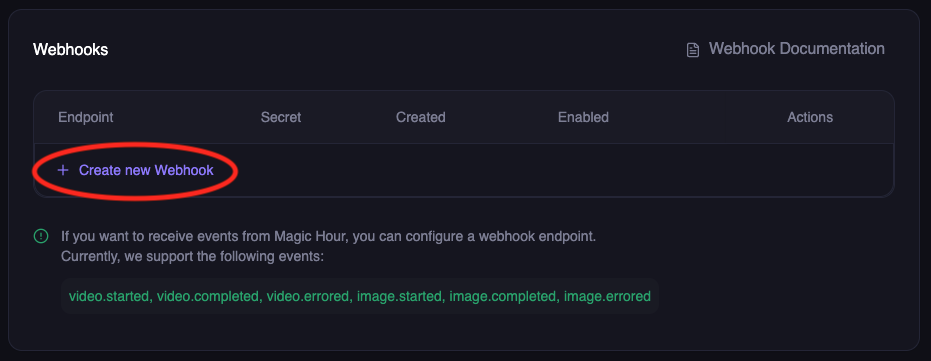
Go to Magic Hour Developer Hub, and click Create WebhookWebhook Table
2

Configure webhook

Enter your webhook details:
  • Endpoint URL: Your public HTTPS URL (e.g., https://abc123.ngrok.io/webhook)
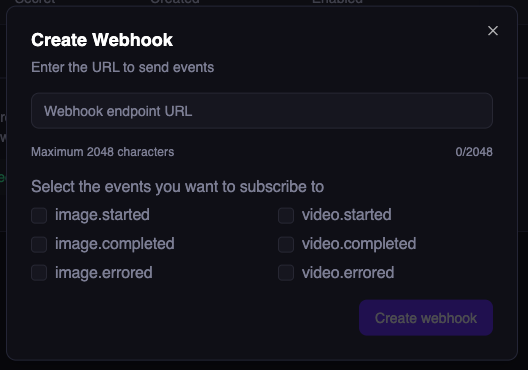
  • Events: Select the events you want to receive:
    • video.started - When video processing begins
    • video.completed - When video is ready for download
    • video.errored - When video processing fails
    • image.completed - When image is ready for download
    • image.errored - When image processing fails
    • audio.completed - When audio is ready for download
    • audio.errored - When audio processing fails Create webhook modal
Click Create Webhook
3

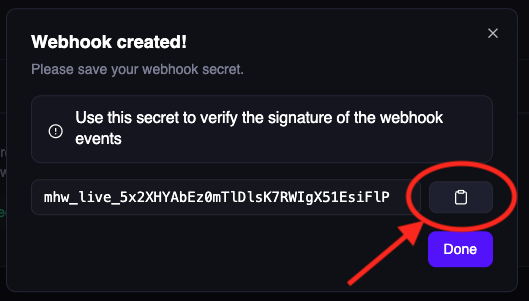
Save webhook secret

Important: Copy and save the webhook secret - you’ll need this for security verification later.Webhook Secret
Store this secret securely! It’s used to verify that webhooks are actually from Magic Hour.

Step 4: Test Your Webhook End-to-End

Now let’s verify everything works by making a real API call and watching for the webhook.
1

Start monitoring your webhook

If using your own server: Watch the console logs
# Your server should show:
🚀 Webhook server running on http://localhost:8000
If using Colab/Jupyter: Watch the cell output for webhook eventsIf using webhook.site: Keep the browser tab open to see incoming requests in real-time
2

Make a test API call

Create a simple image to trigger webhook events:
from magic_hour import Client

client = Client(token="your-api-key")

# Create a simple AI image - this will trigger webhooks
result = client.v1.ai_image_generator.generate(
    image_count=1,
    orientation="square",
    style={"prompt": "A cute cat wearing sunglasses", "tool": "ai-anime-generator"}
)

print(f"Job created! ID: {result.id}")
print("Watch your webhook endpoint for events...")

# In Colab, you'll see the webhook events appear in the cell output above
3

Verify webhook delivery

Within seconds, you should see webhook events in your console or webhook.site:
{
  "type": "image.completed",
  "payload": {
    "id": "clx7uu86w0a5qp55yxz315r6r",
    "status": "complete",
    "downloads": [
      {
        "url": "https://images.magichour.ai/id/output.png",
        "expires_at": "2024-10-19T05:16:19.027Z"
      }
    ]
  }
}
Success! 🎉 Your webhook is working end-to-end.

Understanding Webhook Retries

If your endpoint doesn’t respond with a 2xx status code, Magic Hour will retry delivery:
  • Duration: Up to 24 hours
  • Pattern: Exponential backoff (1s, 2s, 4s, 8s, …)
  • After 24 hours: Event marked as failed, no more retries
Disabled Webhooks: If a webhook is disabled, pending events are skipped and marked as failed after 24 hours.

Best Practices for Reliable Webhooks

Do:
  • Return 2xx status codes within 10 seconds
  • Process events asynchronously (respond fast, process later)
  • Implement idempotent processing (handle duplicate events)
  • Log all webhook events for debugging
Don’t:
  • Perform long-running operations before responding
  • Return non-2xx codes for successful receipt
  • Assume events are delivered exactly once
  • Block the response while processing

Production Webhook Handler

For production, implement robust error handling and background processing:
from fastapi import FastAPI, Request, BackgroundTasks
import logging

app = FastAPI()
logger = logging.getLogger(__name__)

@app.post("/webhook")
async def webhook_handler(request: Request, background_tasks: BackgroundTasks):
    try:
        event = await request.json()

        # Log the event
        logger.info(f"Received webhook: {event['type']}", extra={
            'job_id': event['payload'].get('id'),
            'status': event['payload'].get('status')
        })

        # Respond immediately
        background_tasks.add_task(process_webhook_event, event)
        return {"success": True}

    except Exception as e:
        logger.error(f"Webhook error: {e}")
        return {"error": "Internal error"}, 500

async def process_webhook_event(event):
    """Process webhook in background"""
    try:
        event_type = event['type']
        payload = event['payload']

        if event_type == 'video.completed':
            # Update database
            await update_job_status(payload['id'], 'completed')
            # Notify user
            await notify_user_completion(payload)

        elif event_type == 'video.errored':
            # Handle error
            await update_job_status(payload['id'], 'failed')
            await notify_user_error(payload)

    except Exception as e:
        logger.error(f"Background processing failed: {e}")

Testing Locally

Before registering with Magic Hour, test your handler locally:
# Start your server
python webhook_server.py  # or node webhook_server.js

# In another terminal, send a test event
curl -X POST http://localhost:8000/webhook \
  -H "Content-Type: application/json" \
  -d '{
    "type": "video.completed",
    "payload": {
      "id": "test-job-123",
      "status": "complete",
      "downloads": [
        {
          "url": "https://videos.magichour.ai/test/output.mp4",
          "expires_at": "2024-12-01T12:00:00Z"
        }
      ]
    }
  }'
You should see the event logged in your server console.

Webhook Handler Requirements

Your webhook endpoint must:

1. Accept POST Requests

@app.post("/webhook")  # Must be POST
async def webhook_handler(request: Request):
    ...

2. Parse JSON Payload

event = await request.json()
# event = { "type": "...", "payload": {...} }

3. Return 2xx Status Code

return {"success": True}  # Returns 200
# Magic Hour interprets this as successful delivery

4. Respond Within 10 Seconds

# ✅ Good: Respond fast, process later
background_tasks.add_task(process_event, event)
return {"success": True}

# ❌ Bad: Long processing blocks response
process_event_synchronously(event)  # This might timeout!
return {"success": True}

Troubleshooting

Webhook not receiving events?
  • ✅ Check your endpoint URL is publicly accessible
  • ✅ Ensure your server returns HTTP 2xx status codes
  • ✅ Verify the webhook is enabled in Developer Hub
  • ✅ Check server logs for errors
  • ✅ Test with ngrok or webhook.site first
Colab/Jupyter specific issues:
  • ✅ Install required packages: !pip install fastapi uvicorn nest-asyncio pyngrok
  • ✅ Make sure the server thread started successfully
  • ✅ Check if ngrok tunnel is active and accessible
  • ✅ Try webhook.site as an alternative for quick testing
AsyncIO errors in notebooks?
  • ✅ Use the Colab/Jupyter code version with nest_asyncio.apply()
  • ✅ Don’t run uvicorn.run() directly in notebooks - use the threading approach

Next Steps

Now that your webhook is working:

Secure Your Webhook

Add signature verification to ensure webhooks are from Magic Hour

Event Types Reference

Learn about all available webhook events and their payloads

Webhook API Reference

Complete webhook API documentation

First Integration

Build a complete integration from scratch

Need help? Join our Discord community or email support@magichour.ai